> ## Documentation Index
> Fetch the complete documentation index at: https://docs.noblecheats.net/llms.txt
> Use this file to discover all available pages before exploring further.
# Wave Executor
> This guide is split into easy step-by-step sections for a smooth and successful setup.
Please follow all instructions carefully. Skipping steps may cause the setup to fail.
**TIP:** To keep things as safe as possible, rely mostly on ESP and only use the more obvious features here and there.
***
## Disable Windows Defender
Antivirus often flags game cheats as suspicious because they inject code or modify games to enable features like aimbot or ESP. This is normal behavior for all cheat software - not a sign that Noble Cheats is unsafe.
1. Open Windows Security
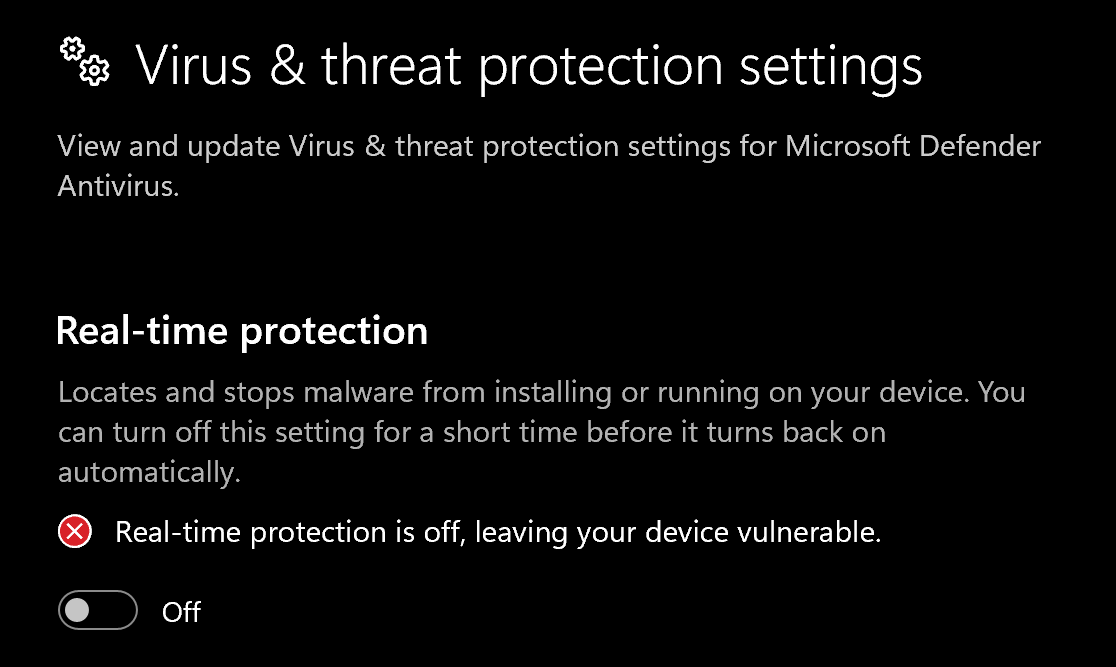
2. Go to **Virus & threat protection** > **Manage settings**
3. Turn off all protection settings:
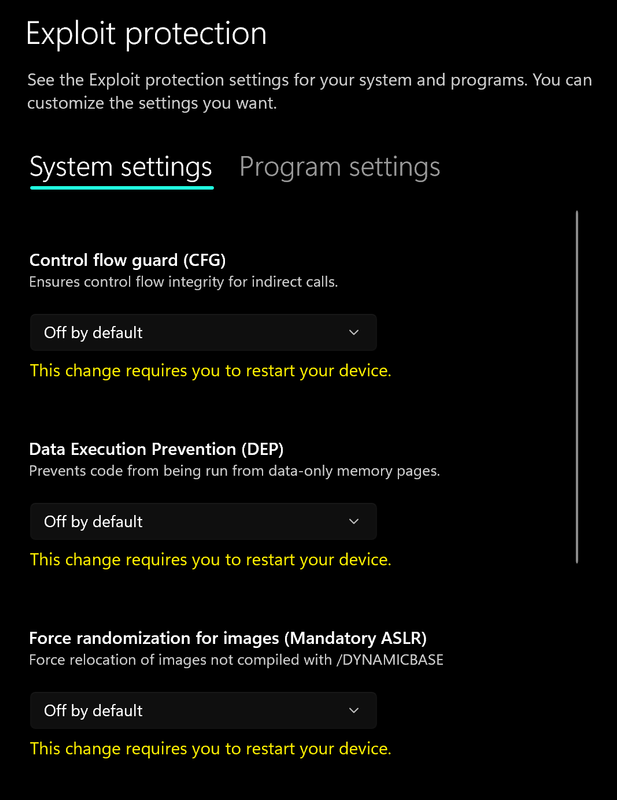
 4. Go to **App & browser control** > **Exploit protection settings**
5. Select **"off by default"** for each option
4. Go to **App & browser control** > **Exploit protection settings**
5. Select **"off by default"** for each option
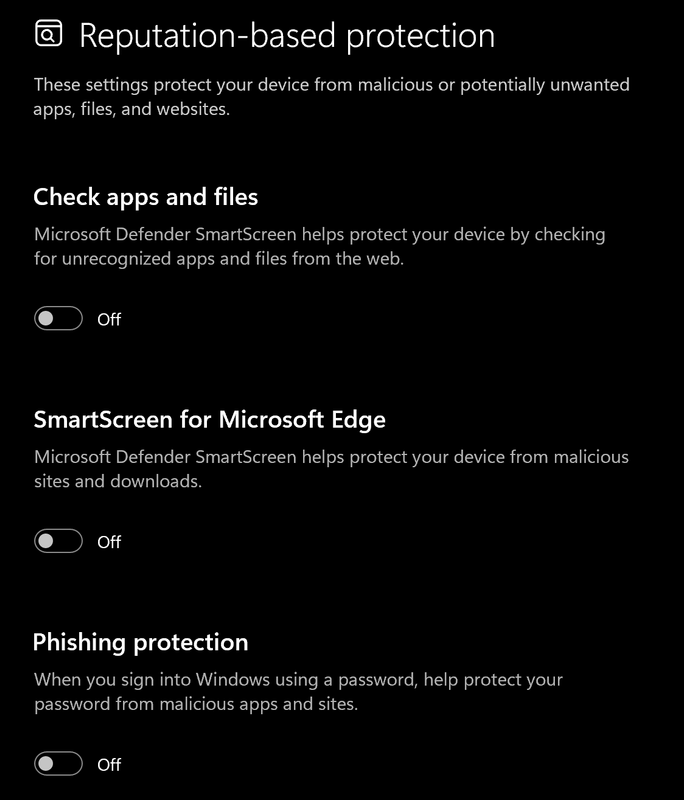
 6. Go to **App & browser control** > **Reputation-based protection settings**
7. Turn off all options
6. Go to **App & browser control** > **Reputation-based protection settings**
7. Turn off all options
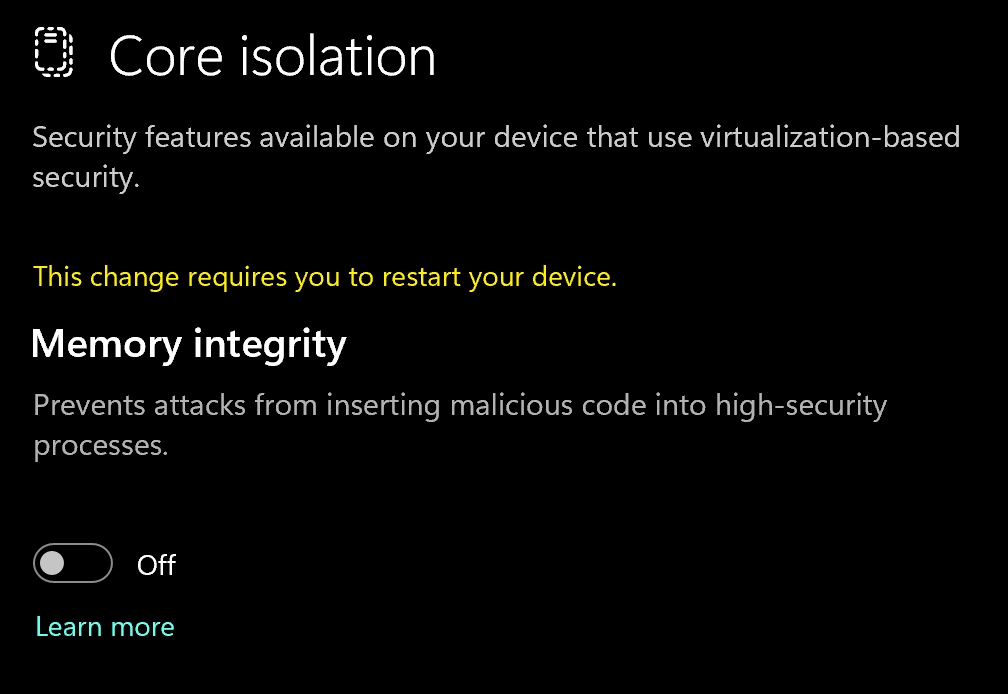
 8. Go to **Device security** > **Core isolation**
9. Turn off **Memory integrity**
8. Go to **Device security** > **Core isolation**
9. Turn off **Memory integrity**
 ### Using DControl
If Windows Defender keeps re-enabling, use DControl:
1. Download [WinRar](https://www.win-rar.com/download.html?\&L=0) and install it. *(Needed to extract archives)*
2. Download [DControl](https://www.sordum.org/files/downloads.php?st-defender-control)
3. Extract the .rar archive with password **"sordum"**
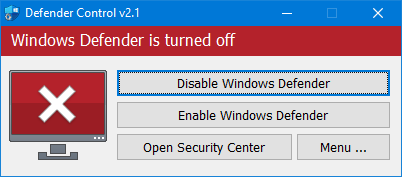
4. Open DControl then press **"Disable Windows Defender"**
### Using DControl
If Windows Defender keeps re-enabling, use DControl:
1. Download [WinRar](https://www.win-rar.com/download.html?\&L=0) and install it. *(Needed to extract archives)*
2. Download [DControl](https://www.sordum.org/files/downloads.php?st-defender-control)
3. Extract the .rar archive with password **"sordum"**
4. Open DControl then press **"Disable Windows Defender"**
 ### Required Files
[https://www.microsoft.com/en-us/download/details.aspx?id=35](https://www.microsoft.com/en-us/download/details.aspx?id=35)
[https://aka.ms/vs/17/release/vc\_redist.x64.exe](https://aka.ms/vs/17/release/vc_redist.x64.exe)
## Cheat Loader Download
You can download the Executor from the link below:
[https://getwave.gg/downloads/Wave.exe](https://getwave.gg/downloads/Wave.exe)
## Loading/Injecting
1. Launch Wave executor
2. Enter the license you got sent via email or get it in your customer panel after purchase.
3. Launch Roblox (wave will auto inject for you)
***
## Common Errors
1. Download: [Cloudflare Warp](https://one.one.one.one/)
2. Connect to Warp then try to launch the loader!
Uninstall previous Water files using Revo Uninstaller:
[https://www.revouninstaller.com](https://www.revouninstaller.com)
If the issue persists, reinstall Fishstrap:
[https://fishstrap.app](https://fishstrap.app)
Clear Files (IMPORTANT): Press Win + R, type %localappdata%, press Enter Go to \Water and delete all files Go back to AppData and delete the Fishstrap and Bloxstrap folders Reinstall everything from scratch:
[https://fishstrap.app](https://fishstrap.app)
1. Fully close Wave
2. Reopen Wave (license should redeem automatically) If it still doesn't redeem:
Open Command Prompt as Administrator and type: `ipconfig /flushdns` \
Then Restart the computer
Press **Win + R**, type `%localappdata%`, press Enter Replace the \Water and \Water.WebView2 folders Note: Extract both ZIP files first, then replace the old folders with the new ones \
Water.zip: \
[https://1drv.ms/u/c/20cbc2d93aa72b48/IQDcmGXOBZiOR4olt2w9n\_bEAb1UloUrroGJfAZK8f0O5is?e=To2Wur](https://1drv.ms/u/c/20cbc2d93aa72b48/IQDcmGXOBZiOR4olt2w9n_bEAb1UloUrroGJfAZK8f0O5is?e=To2Wur)
Water.WebView2.zip:\
[https://1drv.ms/u/c/20cbc2d93aa72b48/IQD2ThNh1vfTT71CCDHqodXGAS-qVzhFmnxwqvr6I5nrmDU?e=vRq1En](https://1drv.ms/u/c/20cbc2d93aa72b48/IQD2ThNh1vfTT71CCDHqodXGAS-qVzhFmnxwqvr6I5nrmDU?e=vRq1En)
***
## Need Help?
If you're stuck on something, unsure about a step, or seeing an error, reach out to our support team for support.
[https://noblecheats.net/web-support/](https://noblecheats.net/web-support/)
### Required Files
[https://www.microsoft.com/en-us/download/details.aspx?id=35](https://www.microsoft.com/en-us/download/details.aspx?id=35)
[https://aka.ms/vs/17/release/vc\_redist.x64.exe](https://aka.ms/vs/17/release/vc_redist.x64.exe)
## Cheat Loader Download
You can download the Executor from the link below:
[https://getwave.gg/downloads/Wave.exe](https://getwave.gg/downloads/Wave.exe)
## Loading/Injecting
1. Launch Wave executor
2. Enter the license you got sent via email or get it in your customer panel after purchase.
3. Launch Roblox (wave will auto inject for you)
***
## Common Errors
1. Download: [Cloudflare Warp](https://one.one.one.one/)
2. Connect to Warp then try to launch the loader!
Uninstall previous Water files using Revo Uninstaller:
[https://www.revouninstaller.com](https://www.revouninstaller.com)
If the issue persists, reinstall Fishstrap:
[https://fishstrap.app](https://fishstrap.app)
Clear Files (IMPORTANT): Press Win + R, type %localappdata%, press Enter Go to \Water and delete all files Go back to AppData and delete the Fishstrap and Bloxstrap folders Reinstall everything from scratch:
[https://fishstrap.app](https://fishstrap.app)
1. Fully close Wave
2. Reopen Wave (license should redeem automatically) If it still doesn't redeem:
Open Command Prompt as Administrator and type: `ipconfig /flushdns` \
Then Restart the computer
Press **Win + R**, type `%localappdata%`, press Enter Replace the \Water and \Water.WebView2 folders Note: Extract both ZIP files first, then replace the old folders with the new ones \
Water.zip: \
[https://1drv.ms/u/c/20cbc2d93aa72b48/IQDcmGXOBZiOR4olt2w9n\_bEAb1UloUrroGJfAZK8f0O5is?e=To2Wur](https://1drv.ms/u/c/20cbc2d93aa72b48/IQDcmGXOBZiOR4olt2w9n_bEAb1UloUrroGJfAZK8f0O5is?e=To2Wur)
Water.WebView2.zip:\
[https://1drv.ms/u/c/20cbc2d93aa72b48/IQD2ThNh1vfTT71CCDHqodXGAS-qVzhFmnxwqvr6I5nrmDU?e=vRq1En](https://1drv.ms/u/c/20cbc2d93aa72b48/IQD2ThNh1vfTT71CCDHqodXGAS-qVzhFmnxwqvr6I5nrmDU?e=vRq1En)
***
## Need Help?
If you're stuck on something, unsure about a step, or seeing an error, reach out to our support team for support.
[https://noblecheats.net/web-support/](https://noblecheats.net/web-support/)